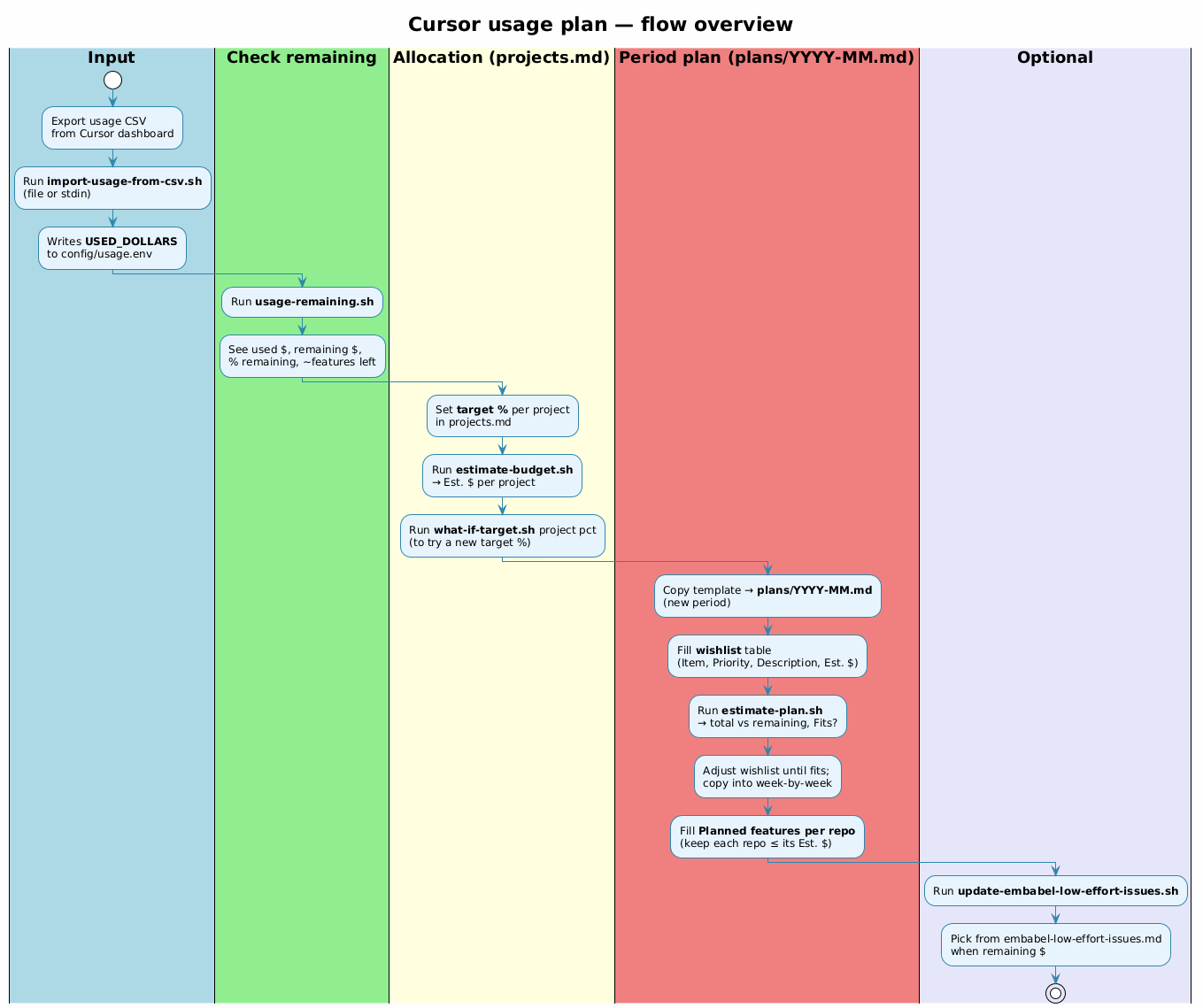
Five phases: Input → Check → Allocate → Plan → Optional
Cursor Ultra gives you a fixed $400 budget each billing period. It resets on a specific day (the 17th in my case)—use it or lose it. Without tracking, you either burn through it early or leave budget unused.
I built cursor_usage_plan—shell scripts and markdown templates to plan usage across projects. It's a template repo: clone it, configure your projects, adapt the scripts.
The Two-Document Workflow
| projects.md | plans/YYYY-MM.md | |
|---|---|---|
| Purpose | Allocation: target % per project | This period's wishlist + schedule |
| Scripts | estimate-budget.sh |
estimate-plan.sh |
The Five Phases
Phase 1: Input
Export usage CSV from Cursor dashboard, then:
Export usage CSV from Cursor dashboard, then:
./scripts/import-usage-from-csv.sh export.csv
Writes USED_DOLLARS to config/usage.env.
Phase 2: Check
See what's left:
See what's left:
./scripts/usage-remaining.sh
Shows: used $, remaining $, % left, ~features remaining.
Phase 3: Allocate
Set target % in
Set target % in
projects.md, then:./scripts/estimate-budget.sh
Keep 10–15% unassigned as buffer.
Phase 4: Plan
Create monthly plan with wishlist (P0/P1/P2 priorities):
Create monthly plan with wishlist (P0/P1/P2 priorities):
./scripts/estimate-plan.sh plans/2026-02.md
Output: "Fits in $400: Yes/No". Drop P2 items until it fits.
Phase 5: Optional
Budget expires on reset day. Use leftover $:
Budget expires on reset day. Use leftover $:
./scripts/update-embabel-low-effort-issues.sh
Note: Embabel scripts are examples—adapt for your projects.
Configuration
MONTHLY_BUDGET_DOLLARS=400
BUDGET_ROLLOVER_DAY=17
DOLLARS_PER_FEATURE=20
Tips
- Plan in $ — Estimate each feature to sum to ~$400
- Check weekly — Run
usage-remaining.sh; if high, add work - Keep buffer — Reserve 10–15% for ad-hoc
- End-of-period — Burn remaining $ before reset

No comments:
Post a Comment